Mapping read codes
Use Read Codes Mapping to map read codes from external systems to read codes within IEE. You must import or manually create read codes before you can map them. For more information, see Importing read codes.
-
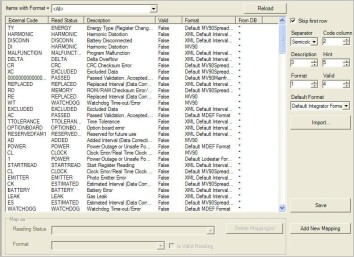
Go to System Administration > System Admin > Read Codes Mapping.
-
(Optional) Using the Items with Format dropdown menu, filter the list of read codes.
-
Click any External Code (read code) to select it. If more than one code shares the same reading status and format, use SHIFT-Click or CTRL-Click to select multiple rows.
-
In the Map as pane, select a Reading Status to assign to this code.
-
Select a Format to assign to this code.
-
If the Read code is a valid status, select Is Valid Reading.
-
Click Save.